แสดงบทความที่มีป้ายกำกับ amd แสดงบทความทั้งหมด

วันพฤหัสบดีที่ 13 สิงหาคม พ.ศ. 2563

ทดสอบไดรเวอร์ AMD Pro driver 20.Q3

 สวัสดีครับทุกท่านที่เข้ามาอ่านบล๊อคนี้ครับ 

วันนี้วันที่ 13 สิงหาคม 2563 เลยวันแม่มา 1 วัน วันแม่ปีนี้พิเศษเพราะว่าทาง AMD ได้ออกไดรเวอร์ตัวใหม่ นั่นก็คือ Pro driver 20.Q3 เช้านี้ผมจึงลองโหลดมาทำการปรับแต่งและติดตั้งเพื่อเปรียบเทียบกับรุ่นก่อนหน้านี้คือรุ่น 20.Q2.1 

Spec เครื่องที่ใช้ทดสอบคือ

CPU X5650 X2 2.66 GHz

VGA: Vega@Wx9100

HDD 4TB 7200rpm

Board Asus Z8NA-D6

Ram DDR3 1333 Reg ECC 96 GB

ผลการทดสอบด้วย Specviewperf 13 ได้ผลดังนี้

คะแนนของไดรเวอร์ 20.Q3

คะแนนของไดรเวอร์ 20.Q2.1

โดยส่วนใหญ่แล้วคะแนนจะเพิ่มขึ้นยกเว้นโปรแกรม Catia ที่มีคะแนนต่ำลง

ทั้งนี้การทดสอบนี้อาจให้ผลที่น้อยไปเพราะว่าระบบโดยรวมค่อนข้างเก่าครับ

สำหรับลูกค้าผมที่อยากอัพเกรดไดรเวอร์ใหม่นี้ สามารถดาวน์โหลดไดรเวอร์ที่ผมแก้ไขสำหรับการ์ดจอ Vega 64 ได้จาก ที่นี่ ครับ 


วันพฤหัสบดีที่ 14 พฤษภาคม พ.ศ. 2563

How to overclock Vega frontier edition or other AMD Vega workstation graphic card.

Hi everyone.
It's generally known that the Vega GPU it's has 3 version
1.Workstation
2. Instinct
3.Gaming

For the special version of the vega 10 is " Frontier edition " it's the common between gaming and workstation graphic card.

The professional driver of the AMD is cannot be tuning or overclocking.but today I want to show "How to trick for overclocking the card on the professional graphics card."

Open the registry and then browse to
 HKEY_LOCAL_MACHINE\SYSTEM\CurrentControlSet\Control\Class\{4d36e968-e325-11ce-bfc1-08002be10318}\0000
create DWORD value  "KMD_IsGamingDriver"
and set it's value to 1
If not the effect you can find folder 0001 or 0002 ... 
and make the same dword value to 1.

If successful you can adjust core/mem/fan/voltages up to you like gaming driver.

Good luck.


วันอังคารที่ 12 มิถุนายน พ.ศ. 2561

Realview on all hardware by easy step.

Hello World !!
      Today I will describe about How to Realview hack for all PC target to use SolidWorks.
Step 0. Check your VGA with registry
0.1 - Press "Windows"+"R " on your keyboard for lunch "Run"window command.
0.2 - Type " regedit " in run windows and press "Enter"
0.3 -  Follow " HKEY_CURRENT_USER"-->"SOFTWARE"-->"SolidWorks"-->"SolidWorks20XX"-->"Performance"-->"Graphics"-->"Hardware"-->"Current"

0.4 - Look in the right side at the " Renderer" and then double click and select copy for copy the value data of the current renderer. And then go to key " GI2Shaders" ( Hardware key sub folder )

0.5 - Check manufacturer for your VGA
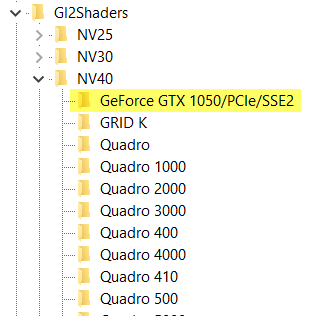
    0.5.1 - If manufacturing by Nvidia  the subfolder will use NV for prefix naming like NV25,NV30,NV40 ( Number is the series of product chip )
    0.5.2 - If manufactured by AMD , ATI  the subfolder will use R and RV to naming prefix.
    0.5.3 - If other manufactured the subfolder will use name is "Other" 

Step 1. - Select correct subfolder to matching with your model graphic card.
" For example I have GTX1050 I will select NV40 subfolder."
1.1 - For make sure to validate the name of nvidia's chip you can follow this link.
1.2 - For make sure to validate the name of AMD/ATI's chip you can follow this link.

Step 2. - Create key in selected subfolder using copied name in step 0.3


Step 3. - Right Mouse Button click and create new "DWORD (32 Bit ) Value"


Step 4.- Naming to " Workarounds " and double click it to change value to "30408" in " Hexadecimal "
You can use 10008 , 20008 , 30008 , 30408 , 31408 

After this step you will fun with Realview Graphic.

ถังก๊าซ LPG มีอายุเท่าไหร่

สวัสดีครับท่านผู้อ่าน เกี่ยวกับคำถามเรื่องอายุถังก๊าซ LPG ที่ใช้ในรถยนต์ ที่ถามกันบ่อยๆ เพราะบางท่านได้บอกว่า ถังมีอายุ 10 ปีบ้าง 20 ปีบ้าง ...